Costa Rica Checkout for WooCommerce is a free WordPress plugin I published on November 9, 2026. It adds what a WooCommerce store in Costa Rica needs and WooCommerce does not include: SINPE Móvil payments, the dollar exchange rate, provinces with their cantons and districts, and the customer's ID number for electronic invoices.
Each part is a module you turn on or off in WooCommerce > Settings > Costa Rica. The plugin is GPL licensed, with no paid version, no locked features, no ads and no tracking. It is not affiliated with the Central Bank of Costa Rica (BCCR) or the Ministerio de Hacienda. There is a short version in Spanish at the end.
SINPE Móvil payments
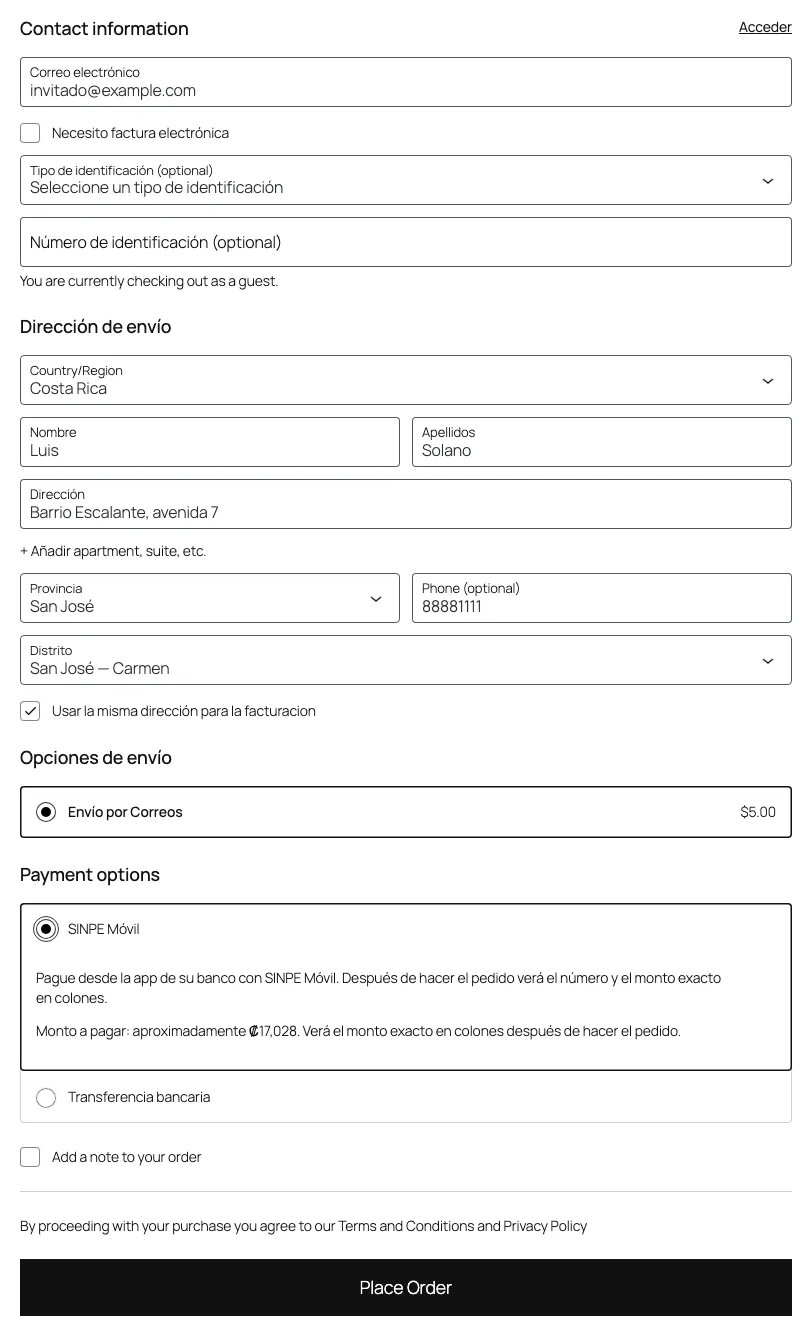
SINPE Móvil is how many people in Costa Rica pay: a transfer from their bank app to a phone number. The plugin adds it as a manual payment method. The customer pays from their bank app and the store confirms the payment from the order screen.
After the order, the order received page and the email show the SINPE Móvil number, the account holder, the exact amount in colones and the order number to use as the reference.
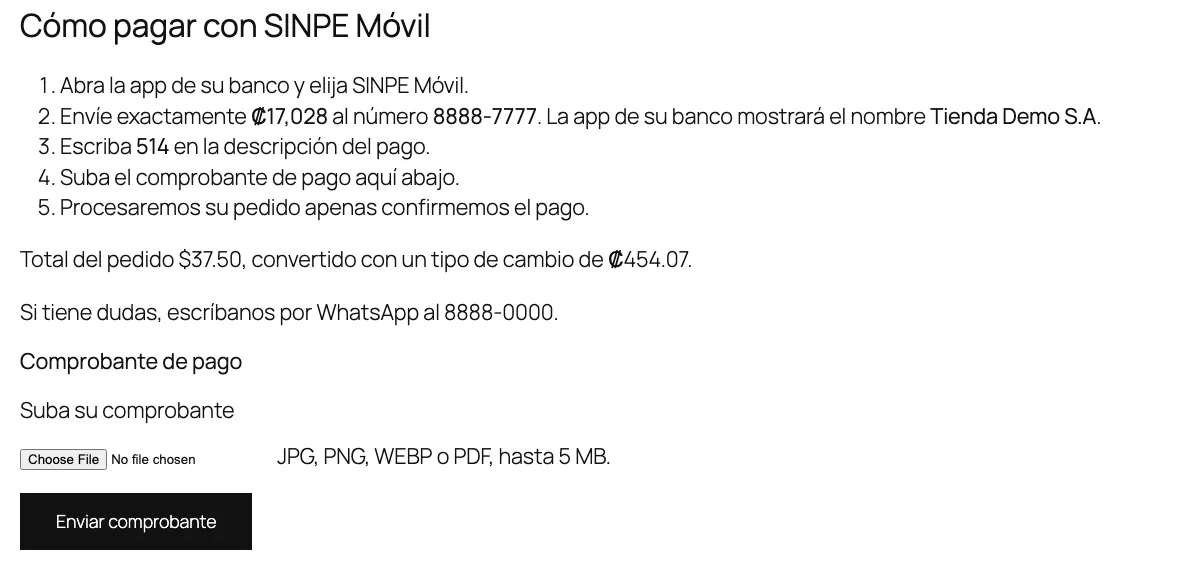
- Stores that sell in dollars. The amount in colones uses the day's rate, sell or buy, plus an optional surcharge. It is rounded up and saved in the order, so a later change in the rate does not change what the customer owes.
- Receipts. The customer uploads the transfer receipt as a JPG, PNG, WEBP or PDF from the order received page or from My Account. Receipts are stored privately, outside the media library. Only store staff and that customer, logged in, can see them.
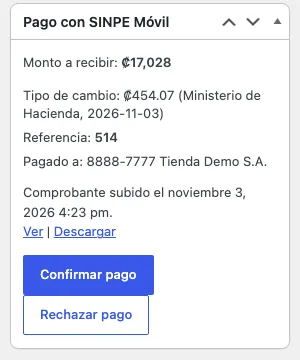
- Confirming. The store gets an email when a receipt arrives, and the order screen has Confirm payment and Reject payment buttons.
- Bank limits. An optional maximum per order keeps SINPE Móvil from showing above your bank's limit.
Exchange rate
The plugin reads the dollar buy and sell rates from the Ministerio de Hacienda, with no credentials, or from the BCCR, with your own BCCR token. You can also set a manual rate.
This module is off by default, and the plugin makes no external connection until you turn it on. Then it fetches the rate right away and every 12 hours after that, in the background. The checkout always reads the stored rate, so a customer never waits for an outside service.
If the source fails, the plugin keeps the last good rate. If that rate gets too old, the store sees a warning and stores that sell in dollars stop offering SINPE Móvil, so nobody pays with an outdated rate. No customer or order data is sent anywhere.
To show the rate on any page, use the Exchange rate (Costa Rica) block or the shortcode:
[crkit_exchange_rate type="sell" show_date="yes" show_source="no"]type takes both, sell or buy. show_date, show_source, hide_outdated and inline take yes or no. Use inline="yes" when the rate sits inside a sentence.
Provinces, cantons and districts
Costa Rican addresses go by province, canton and district, and WooCommerce only includes the provinces. The plugin uses the official 2025 territorial division from Decreto Ejecutivo 44882-MGP, published in Alcance 12 to La Gaceta 17 on January 28, 2025: 7 provinces, 84 cantons and 492 districts.
The data comes straight from the decree's PDF, read by a script in the repository. The script handles vacant district codes and an erratum in the decree itself.
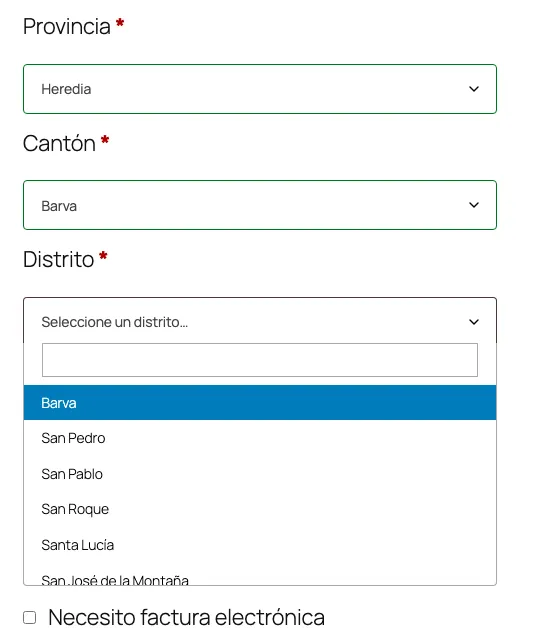
- Classic checkout and My Account. Dependent lists with search: province, then canton, then district.
- Block checkout. It does not allow dependent lists, so after the province there is one list with that province's districts, labeled with their canton and sorted by canton, which keeps them easy to find on a phone.
- Standard fields. The canton is saved as the city and the 5-digit district code as the postcode, so shipping zones by postcode and other plugins keep working.
- Display. Addresses read "District, Canton, Province" in orders, emails and My Account.
ID numbers for electronic invoices
To issue an electronic invoice, Hacienda needs the customer's ID type and number. The plugin adds both fields to the classic and block checkouts, with four types: cédula física, cédula jurídica, DIMEX and NITE.
The number is checked against the format Hacienda sets for each type in its technical documents for electronic receipts, version 4.4, including the April 2026 update. A cédula física has 9 digits and does not start with 0, and a DIMEX has 11 or 12. The new cédulas jurídicas with letters, announced by the Registro Nacional, are accepted. Hyphens and spaces are removed.
The store chooses whether the ID is optional, required, or required only when the customer checks Necesito factura electrónica, which is the default.
The ID appears next to the billing address in the order screen, the emails, the order received page and My Account, where the customer can change it. When the customer asks for an invoice, the store's email says so, and the customer's email shows the ID the invoice will go to, for example "Factura electrónica solicitada a nombre de: Cédula física 112340567". Typing mistakes get caught before the invoice is issued.
What it does not do
- It does not confirm SINPE Móvil payments on its own. There is no public API to verify transfers, so the store checks the receipt against its account and confirms by hand.
- It does not issue electronic invoices. It stores the ID for whatever invoicing plugin the store uses.
- It does not calculate shipping rates.
Get started
- Install and activate WooCommerce.
- In Plugins > Add New Plugin, search for
Costa Rica Checkout, then install and activate it. - If your store sells in dollars, turn on the exchange rate module in WooCommerce > Settings > Costa Rica and check the source. Stores that sell in colones do not need it.
- In WooCommerce > Settings > Payments > SINPE Móvil, enter the number and the account holder, and enable the method.
- Optionally, turn on the provinces, cantons and districts module and the ID module.
It requires WordPress 6.7, PHP 8.1 and WooCommerce 10.0 or later, and it is tested with WordPress 7.1 and WooCommerce 11.2. It works with the block and classic checkouts, and with both HPOS and the classic order storage. Spanish translations for Costa Rica and Spain are included and load from WordPress 6.8 on.
For developers
An invoicing plugin can read the ID from any order:
add_action( 'woocommerce_order_status_completed', function ( $order_id ) {  $id = crkit_get_order_identification( $order_id );
  if ( null === $id || ! $id['electronic_invoice'] ) {    return;  }
  // $id['type'] is Hacienda's code: 01 física, 02 jurídica, 03 DIMEX, 04 NITE.  // $id['number'] has no hyphens or spaces.} );
The exchange rate is available the same way, and it never triggers an external request:
$sell = crkit_get_exchange_rate(); // null if the module is off or the rate is outdated$crc = crkit_convert_to_crc( 25.00, 'USD' ); // converted with the sell rateOther hooks include crkit_sinpe_payment_confirmed, crkit_sinpe_payment_rejected, crkit_sinpe_receipt_uploaded, crkit_exchange_rate_updated, crkit_rate_providers to add rate sources, the crkit_order_identification filter and the crkit_order_identification_saved action.
The payment instructions and email templates can be overridden from your theme, in your-theme/costa-rica-checkout-for-woocommerce/. The plugin also suggests privacy policy text and plugs receipts and IDs into the WordPress and WooCommerce tools for exporting and erasing personal data.
How it was built
I wrote a specification and built the plugin with Claude Code working from it, reviewing and approving each phase. Each phase had its own pull request: structure and tooling first, then the exchange rate and SINPE Móvil, then provinces, cantons and districts with the shortcode, then the ID, then the WordPress.org release.
- Unit tests: 147.
- Integration tests: 109, run on real WordPress and WooCommerce in the three order storage modes: HPOS, classic and synchronized.
- End-to-end tests: a Playwright matrix of 60 checks per release, across PHP 8.1 and 8.3, stores in colones and in dollars, the three storage modes, both checkouts, and guest and registered customers.
- Accessibility: axe finds no WCAG 2.1 A or AA issues in the plugin's components, and keyboard navigation is tested on the forms.
- Continuous integration: 11 GitHub Actions jobs on every change, including one on the minimum versions, WordPress 6.7 with WooCommerce 10.0.
- Standards: WordPress Coding Standards and PHPStan level 6. Plugin Check, the official WordPress.org tool, reports no errors and no warnings.
- Releases: a version tag on GitHub builds the plugin and uploads it to WordPress.org.
Taking the screenshots for WordPress.org turned up real bugs: internal text showing in the block checkout's address card, and the shortcode overflowing the page width in block themes. Both were fixed before release.
The timeline, from the first commit to the release:
| Date | Step |
|---|---|
| Oct 31 | First commit |
| Nov 3 | Renamed from Costa Rica Kit to Costa Rica Checkout, audited by an independent reviewer against the 18 directory guidelines and the security criteria, and submitted |
| Nov 6 | First WordPress.org review, fixed the same day |
| Nov 8 | Approved |
| Nov 9 | Version 1.0.0 published |
The independent reviewer was another agent that had not seen the development, and it found nothing blocking. The WordPress.org review asked for three changes: no connection to Hacienda without the merchant's permission, which is why the exchange rate module now ships off, a review of the nonces, and removing an unneeded call that loaded translations.
Known limitations
- The shipping calculator in the classic cart does not ask for canton or district, so rates that depend on them are exact only at checkout.
- In the block checkout, the district list has no search. It is sorted by canton instead.
- The ID is checked by format only. It is not looked up in any registry.
- There are no ID types for foreigners who don't live in Costa Rica. A customer from abroad can still buy without asking for an invoice.
- On WordPress 6.7 the plugin shows in English. The included translations load from WordPress 6.8.
The next step is moving the Spanish translations to translate.wordpress.org, so WordPress.org builds the language packs and stops showing that the plugin is not translated yet.
Get the plugin
Costa Rica Checkout for WooCommerce is on WordPress.org. The code is on GitHub, where you can report bugs or suggest changes. Reviews on WordPress.org and help with translations on translate.wordpress.org are welcome.
En español
Costa Rica Checkout for WooCommerce es un plugin gratuito de WordPress para tiendas WooCommerce en Costa Rica. Agrega pagos con SINPE Móvil, el tipo de cambio del dólar, provincias con sus cantones y distritos, y el número de identificación del cliente para la factura electrónica. Cada parte es un módulo que se activa o desactiva en WooCommerce > Ajustes > Costa Rica.
Con SINPE Móvil, el cliente ve el número, el titular y el monto exacto en colones, y sube el comprobante desde la página del pedido o desde Mi cuenta. La tienda confirma o rechaza el pago desde el pedido. En las tiendas que venden en dólares, el monto en colones se calcula con el tipo de cambio del día y queda guardado en el pedido.
El tipo de cambio viene del Ministerio de Hacienda, del BCCR con un token propio o de un valor manual. Viene apagado y no hace ninguna conexión externa hasta que la tienda lo activa. Las direcciones usan la división territorial oficial de 2025, y la cédula se valida con el formato que define Hacienda para cada tipo.
El plugin no confirma pagos automáticamente ni genera facturas electrónicas, y no está afiliado al BCCR ni al Ministerio de Hacienda. Para instalarlo, busque "Costa Rica Checkout" en Plugins > Añadir nuevo plugin. Incluye traducciones al español de Costa Rica y de España.